
How To Use AI As Analyst
Turn a finished Scope of Work into a fully researched, governed competitive intelligence report — with a cost quote up front, live competitor verification, and every report generated in parallel.
AI As Analyst takes your finished Scope of Work and turns it into a series of fully researched, governed competitive intelligence reports, all delivered in parallel. Based on Rauch Associates' 30+ years of experience developing proprietary B2B mystery shopping techniques for collecting, verifying, and analyzing primary business intelligence information, AI As Analyst takes these same battle-tested techniques and turns them into the governance rules, control structures, and research discipline that guide every question the AI investigates. The result, while not a shortcut around primary research, is an AI model trained to incorporate primary-research-grade discipline built into the AI itself, not just a search engine summarization.
Seven Steps From SOW To Report
Follow this sequence for a new engagement, from uploading your SOW to receiving a series of finished, decision-ready reports.
Upload your SOW
Upload the SOW you built manually or in Scope Builder (PDF, DOC, or DOCX). AI As Analyst automatically performs a formatting validation scan to ensure your SOW meets the required SOW structure (see How To Use Scope Builder for details on SOW formatting requirements), and provides a specific, itemized list of any syntax that requires modification.
Review your cost estimate — before anything is generated
Once your SOW passes validation, AI As Analyst runs a section-by-section cost estimate and shows you the full breakdown, then asks you to confirm: Total estimated cost: $X.XX per competitor report. Would you like to proceed? (y/n). Nothing is researched until you say yes.
Confirm your primary competitor
AI As Analyst extracts the header fields from your SOW (Project Name, Geographic Focus, Competitor, Product) and — before committing any research budget — runs a live verification check to confirm the named competitor actually exists and is realistically researchable, with a clear yes/no and the reasoning behind it.
Add or remove additional competitors
Want to research more than one competitor against the same SOW? Enter each one as competitor name | product name | geography (use Shift-Enter to add additional competitors). Each addition is verified the same way as your primary competitor before it's added to the batch. Type remove [name] to drop one, or press Enter with nothing typed to finish.
Confirm the batch and launch
You'll see the full competitor list and total batch cost one more time before launch. Once confirmed, AI As Analyst creates a fully independent research instance/job for each competitor — these run as parallel, isolated processes, not a queue, so a five-competitor batch doesn't take five times as long. Each research job will be listed on your My Workspace page so you can see it "Running" and when it is "Completed", after which you can download the "Results"
Governed, section-by-section research
Each instance works through your SOW one section at a time, researching every question with live web search — all run under the same shared proprietary governance standards against your SOW's exact question text, pulled verbatim rather than re-interpreted.
Receive your report
Once every section is researched, AI As Analyst combines all of it into a single report — formatted directly against your original SOW, so the final output mirrors the exact structure and questions you scoped. Once completed, you can download the report results by clicking the "Results" button for the report shown on your My Workspace page.
Benefits of Using AI As Analyst
- You know the cost before you commit. A quote is generated and confirmed before research begins, and the batch total is confirmed again immediately before launch, checked against your organization's budget automatically.
- Nothing gets researched blind. Every competitor — primary or added — is verified as a real, researchable entity via live web search before any budget is spent on it, catching bad company names or unresearchable targets early.
- True parallelism, not a queue. Multiple competitors in one batch run as fully independent processes simultaneously, not sequentially — so scaling from one competitor to ten doesn't scale your wait time.
- Governance-locked consistency. Every question, for every competitor, in every engagement, runs under the same high-quality governance standards — and against the verbatim question text from your SOW, not an AI's re-reading of it.
- The output mirrors your scope, exactly. The final report is generated directly against your original SOW document, so there's no drift between what you asked for and what you get back.
Formatting Your AI Report Correctly For Submission To AITruthCheck™
Prefer to create your own AI report instead of using AI As Analyst? You can still use it with AITruthCheck™ — but it needs to follow a specific set of formatting rules so AITruthCheck™ can process it correctly. Follow the basics below to make sure your AI report isn't flagged by AITruthCheck™
Wrap every answer in RESEARCH FINDINGS / END RESEARCH FINDINGS
Every answered question's evidence needs a literal, single-spaced RESEARCH FINDINGS opener and END RESEARCH FINDINGS closer. Each opener needs exactly one closer before the next question's opener begins. AI TruthCheck™ blocks the submission outright if no openers exist anywhere, and blocks it again if openers and closers don't match up one-to-one or aren't correctly paired — in both cases you'll get a specific error naming the mismatch.
Never place content directly after a closer on the same line
Citations, reference links, or footnotes placed right after END RESEARCH FINDINGS on the same line will be flagged and blocked — AI TruthCheck™ quotes the offending line back to you. Put anything like that in its own clearly separated block instead.
Use a colon after every question identifier — never a period
Every question restatement must read exactly "Atomic Question (verbatim): {ID}: question text" — for example Atomic Question (verbatim): A5: A description of.... Using A5. instead of A5: is blocked with an error naming the exact identifier and line.
Main bullets — stick to •
Use a real bullet character for every main bullet question — either the standard Unicode bullet (•, U+2022) or Word's Wingdings-style bullet (\uf0b7).
Sub-bullets — plain hyphen and space only
Sub-bullets must start with "- " (hyphen, space) — never an asterisk ("* "), and never an en-dash or em-dash.
No literal markdown symbols — outside of RESEARCH FINDINGS
Typed **bold** or __underline__ characters except those that lie between RESEARCH FINDINGS and END RESEARCH FINDINGS are not permitted anywhere in the document.
Structural labels must be exact, undecorated text
Project Description, Background Notes, Section Context, and the metadata prefixes (Project Name:, Language Discipline:, Geographic Focus:, Competitor:, Product:) must appear as plain, case-sensitive, standalone text. A decorated or malformed label (e.g. **Section Context**) is not permitted.
Section headers must sit directly above their first bullet
A line is only recognized as a section header if the very next substantive line is itself a bullet. A header-like line with anything else in between might be flagged as a likely mislabeled header.
Keep page footers out of the body text
Page-number stamps like "47 | Page" should be a true visual PDF/Word footer, not text embedded in the readable content layer.
Main Bullets
• (Word's standard round bullet)Sub-Bullets & Question IDs
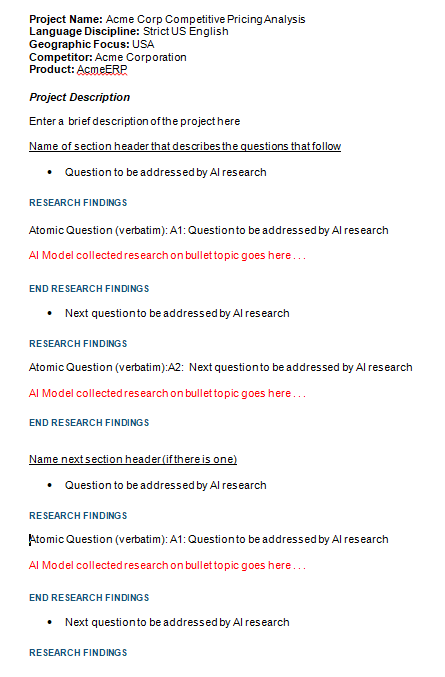
"- ""* ", en-dash, or em-dashA5:A5.Example of A Properly Formatted AI Report
Here's a quick reference showing the required header fields, section structure, main bullets and sub-bullets, and research findings in a properly formatted AI report.
Quick Pre-Submission Checklist
- Every answered question wrapped in
RESEARCH FINDINGS...END RESEARCH FINDINGS, exact and single-spaced - Nothing appended directly after a closer on the same line
- Every question identifier formatted as
"ID: text"— colon, never a period - Main bullets use
•— nothing else - Sub-bullets use
"- "— never"* "or a dash character - No literal
**or__anywhere in the document except betweenRESEARCH FINDINGSandEND RESEARCH FINDINGS— real formatting only Project Description,Background Notes,Section Context, and all metadata labels are exact, undecorated text- Every section header sits directly above its first bullet
- No page-number footers embedded in the body text
Ready to turn your SOW into a researched report? Launch AI As Analyst now and put these steps into practice.
